
Route planning for mobile groomers, measured in real road miles.
Every stop in order with the drive to the next one. One tap to optimise a van’s day. Suggestions when a stop belongs on a different van. And online booking that only offers times the van can reach.
Route optimization is included on every plan, including Starter.
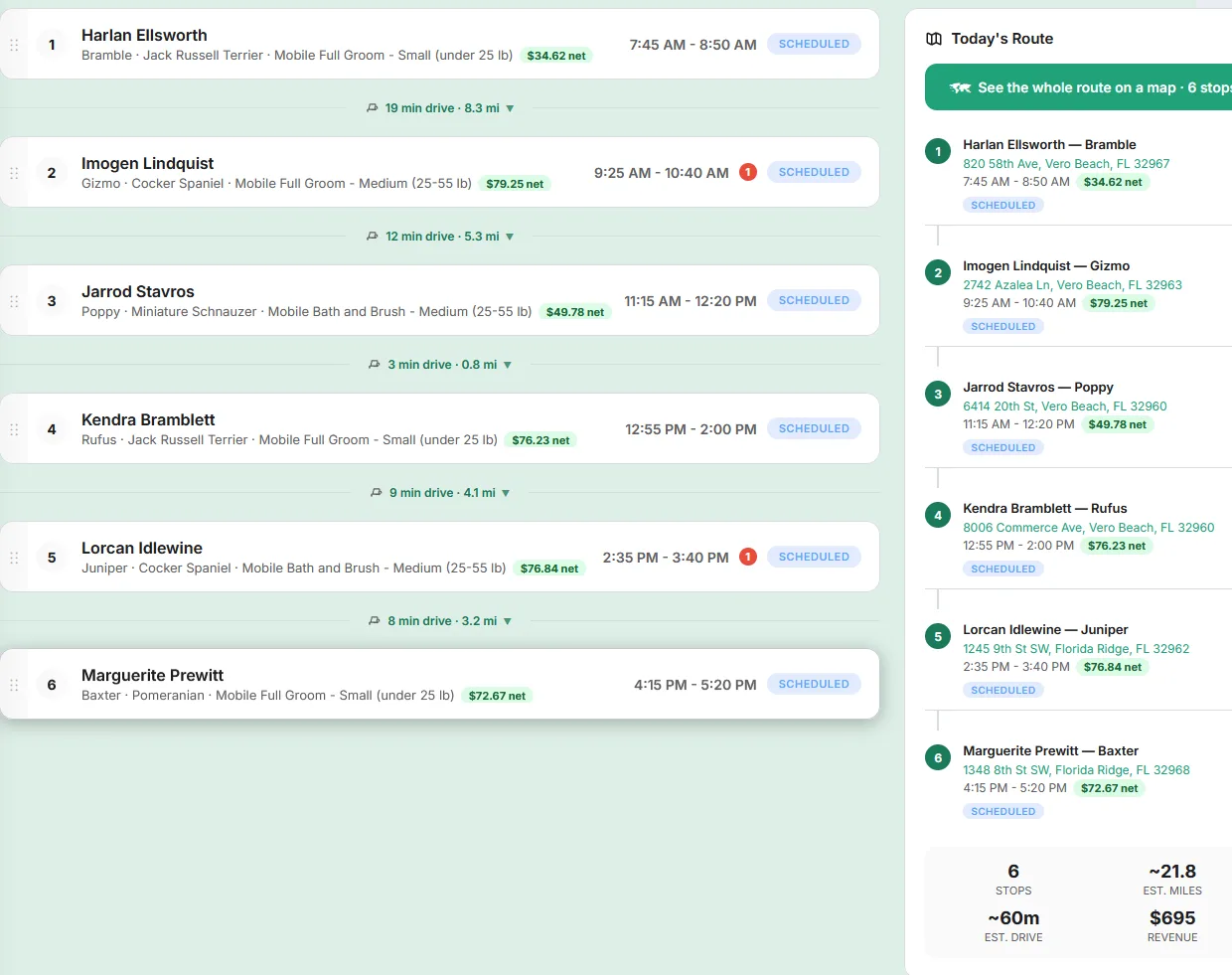
Four layers of route planning
Route planning for a grooming van happens at four moments: when a client books, the night before, during a bad day, and across the fleet.
Only offer times the van can reach
When a client books a mobile groom online, the widget checks each time against where the van already has to be: the previous stop’s end plus the drive must fit before the slot, and the groom plus the drive to the next stop must fit after it. Times that do not fit are hidden. Addresses outside your ZIP list or radius are turned away politely.
Optimise and sanity-check
One tap re-orders the day for the shortest total drive. The day-load check then estimates how long the day will really take, from each pet’s own past grooms, then the breed average, then size, and warns if it will run over.
Rained out, or a cancellation
Rained out? proposes new slots for every stranded stop across the rest of the week, choosing the ones that add the least driving. Fill the gap ranks clients who are reachable between the stops either side and overdue for their usual visit.
Stops on the wrong van
Two vans can each be perfectly optimised and still cross town in opposite directions.
Why measured miles matter
A lot of scheduling software shows a drive estimate between stops that is really a straight line, or a fixed guess. For a mobile groomer, drive time is part of every job and mileage is the fuel bill. A number that looks exact but is wrong is worse than no number.
Animal Friends OS routes every leg on real roads using OpenStreetMap data. If the routing service is slow or down, the board falls back to a straight-line estimate and marks it as an estimate. The same measured legs feed the profit numbers, the van scorecard and the booking check, so they all agree with each other.
A route-planning playbook for mobile groomers
Software helps most when the schedule is built sensibly to begin with. These habits are common among groomers who keep drive time low:
Give each area its own days
Split your service area into zones and assign each zone one or two days a week. When a new client calls from the north side, offer them the north-side days first. The fewer zones a van crosses in a day, the less the optimiser has to fix.
Book regulars on a cadence
Many mobile clients rebook every four to eight weeks. Recurring appointments keep them on the same zone day, so your best routes repeat. Fill the gap uses each client’s own usual interval to see who is overdue.
Use arrival windows, not exact times
A van cannot promise 9:00 exactly. Give clients a window, such as 9 to 11, and send an ETA when you leave the previous stop. You can set the window length so it is stamped on every mobile booking.
Build in a buffer
Parking, unloading, greeting a nervous dog and taking payment all take time that is neither driving nor grooming. Leave room for it, then check the day-load warning before you commit to an extra stop.
Price the drive
A client 25 minutes out costs more to serve than one around the corner. Many groomers set a minimum or price by zone. Our guide to mobile grooming pricing by zone walks through the options, and profit per job shows which stops are paying for the drive.
More: route density for mobile groomers and weather cancellation policies.
Route planning: common questions
How does route optimization work in Animal Friends OS?
Pick a van and press Optimise route. It re-orders that van’s day for the shortest total drive using real road routing, saves the new order, and shows the miles and minutes saved compared with the order you had.
Is route optimization an extra cost?
No. It is on every plan, including Starter at $69 a month. Profit per job, fill the gap and staff-side drive-time checks are on Professional and Premium.
Can it optimise several vans at once?
Each van is optimised on its own, because one route across two vans is a journey nobody drives. Separately, the fleet view compares vans and suggests moving or swapping stops between them when that cuts the combined miles, checked against the appointment times. It suggests; you decide.
How accurate are the drive times?
They come from road routing on OpenStreetMap data, not straight lines. If the routing service cannot answer, the board falls back to a straight-line estimate and labels it as an estimate.
How many stops can it route in a day?
Up to 24 stops per van per day are routed on real roads, which is more than a single groomer can do in a day.
Does the route show up in my maps app?
Each stop has a Navigate button in the app that hands off to Apple Maps on iPhone or your maps app on Android. The dashboard also gives written turn-by-turn directions for every leg that you can print.
Can I reorder stops by hand?
Yes. Drag stops into the order you want on the dashboard. The optimiser never overrides an order you set until you press it again.
Optimise tomorrow’s route tonight.
Add your stops, press Optimise route, and see the miles you save. Included on every plan.
No credit card to start. Month to month. Bring your clients and pets with you.